
Laptop Backpack
Start a laptop backpack comparison with your device’s physical measurements and the sleeve you use. The Chuanxing 028 options are laptop-oriented backpack listings with flap openings and internal pockets, giving you a focused selection for checking access, compartment space and a comfortable strap arrangement.
- Laptop-oriented options
- Flap openings
- Internal pocket organisation
Shop Laptop Backpack
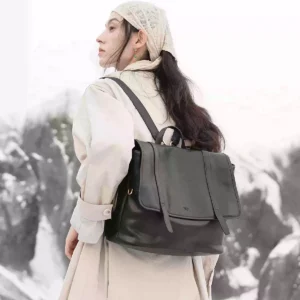
UNIFINE Chuanxing — Cowhide backpack and shoulder bag (028)
Model photo; selected option: Caramel / Fits a 15-inch laptop / Top-grain cowhide
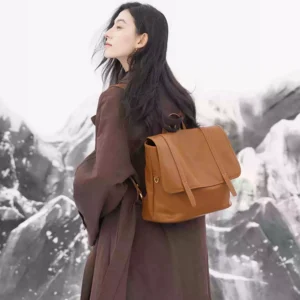
UNIFINE Chuanxing — Cowhide backpack and shoulder bag (028)
Model photo; selected option: Caramel / Backpack / Fits a 15-inch laptop
Check the device compartment and opening
A laptop backpack should accommodate the closed device and its sleeve through the opening and within the intended compartment. Screen size cannot establish that fit on its own. Check width, height and thickness, then ask for usable compartment measurements when the listing provides only a screen-size label or conflicting size information.
Backpack layout and device access
Compare the reviewed Chuanxing laptop options through their opening, pocket layout and carrying arrangement.
Backpack layout
The Chuanxing 028 specification lists two straps and a medium-soft body. Check the rear and side views to understand how the loaded bag rests and where the adjustment sits.
Pocket organisation
The listings include a main compartment, concealed zip pocket and patch pocket. Decide where the charger and cable will sit so they do not obstruct the route used to remove the device.
Material and device-fit evidence
Read the cowhide specification separately from the size labels used for the device compartment.
Cowhide specification
The reviewed laptop options identify top-grain cowhide. Match the product option with the material description and photos, since other variants in the same listing can show a different bag design.
Device-fit evidence
General specifications and active option labels use different screen-size descriptions. This selection makes no guaranteed screen-size fit claim. Confirm the usable compartment and opening for your measured device.
Measure your device before choosing
A screen-size label alone does not describe the outside size of a laptop in its sleeve.
- Measure the laptop closed inside its sleeve, including padded corners.
- Confirm the clear opening and the intended compartment dimensions.
- Check how the flap closes with the device and charger packed.
- Review strap adjustment and the pocket you will use for small accessories.
Laptop backpack checks
| Example | Listed feature | What to check |
|---|---|---|
| Chuanxing 028 laptop options | Flap, main compartment and separate pockets | Usable opening and compartment measurements |
| Chuanxing 028 convertible listing | Backpack with additional carry arrangements shown | Device access after switching carry position |
Product information and sources
MEMOO Editorial selected these listings using their stated design, carrying options and product specifications. Check the details for the option you choose, including its current price and availability. Product measurements and material descriptions belong to the specified model or finish.
About this page
By MEMOO Editorial. Published . Updated .